Objective
Work through a set of SSH authentication logs the way a SOC analyst would: find out whether anything malicious happened, describe the attacker behavior, and write it up as an incident report.
The full project, including the log file, the commands, and the report, is on GitHub: soc-log-investigation.
Environment
- Dataset:
OpenSSH_2k.logfrom LogHub, a public collection of real system logs. It covers about four hours of activity on one Linux server. - Workstation: Ubuntu Linux
- Tools:
grep,awk,sort,uniq, andwcin a Bash terminal. No SIEM. The point was to understand the raw data before letting a tool summarize it.
Investigation
1. Count the failures
grep "Failed password" OpenSSH_2k.log
The log holds 520 failed password attempts. For a four-hour window on one server, that is not a few people mistyping passwords.
2. Find who was attacking
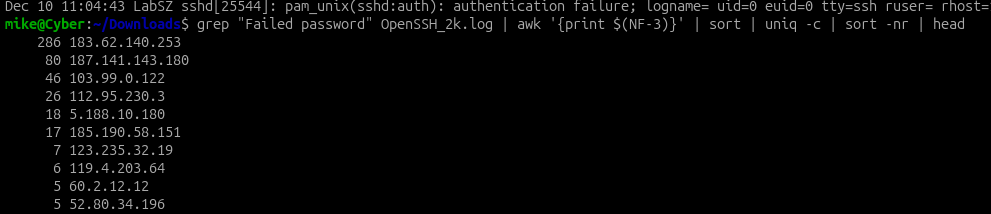
grep "Failed password" OpenSSH_2k.log | awk '{print $(NF-3)}' | sort | uniq -c | sort -nr | head
The failures came from 23 different IP addresses, but most of the volume came from a few. One address alone made 286 attempts, more than half the total. The next two made 80 and 46.
3. Find what they were trying to get into
grep "Failed password" OpenSSH_2k.log | awk '{print $(NF-5)}' | sort | uniq -c | sort -nr | head
370 of the 520 failures targeted root. The next most common target was admin, followed by service-style names like support, oracle, and test. About a quarter of the failures (135) were for usernames that do not exist on the server at all. That is the signature of automated password guessing that works from a list of common account names, not someone targeting this server’s real users.

4. Look for anything that got in
grep "Accepted password" OpenSSH_2k.log
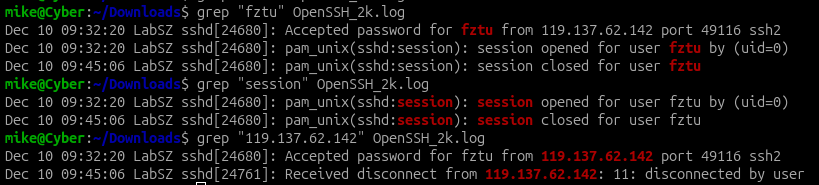
Out of all that traffic, exactly one login succeeded: user fztu, from 119.137.62.142.

5. Follow that session
grep "fztu" OpenSSH_2k.log
The session opened at 09:32:20 and closed normally at 09:45:06, about 13 minutes later.
What the successful login does and does not show
This was the part worth slowing down on.
- It succeeded on the first attempt. There were no failed passwords for
fztubefore it. - It came from a different address.
119.137.62.142does not appear anywhere in the brute-force traffic. It shows up only for this one session.
A login that succeeds cleanly from an address with no failed attempts could be a legitimate user. It could also be an attacker using credentials obtained somewhere else. The logs alone cannot tell those apart, and there is no command history to show what the session did. So I rated it medium risk, pending verification, rather than calling it either a compromise or a false alarm.
Assessment
The log shows automated SSH brute-force activity consistent with internet-wide scanning: a few high-volume sources, privileged and common account names, and many usernames that do not exist. None of that traffic succeeded. The one successful login is separate from the attack traffic and needs confirmation from the account owner, along with endpoint logs or command history if they exist.
Recommendations
- Confirm with the owner of
fztuwhether the 09:32 session was theirs - Disable SSH login for
root - Require multi-factor authentication or key-based authentication for SSH
- Block or rate-limit sources after repeated failures
- Watch for logins from addresses with no prior history on the server
What I took from it
Most of the work was not finding the attack. 520 failures are easy to spot. The real work was the one quiet line among them, and being precise about what it proves. That is why I’m now building a Splunk lab: I want to see how the same questions become automatic detections, having already answered them by hand.